
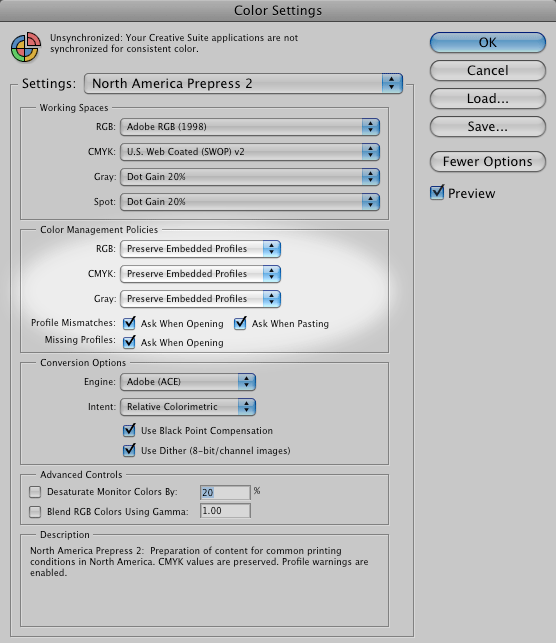
 Photoshop CS3 Color Settings/Color Management Policies: "Preserve Embedded Profiles" turned on and "Ask When Opening and Pasting" checked for mismatches and missing profiles.
camera profiles
Each camera, even compared to others of the same model, has unique characteristics. Although not so essential as monitor and printer profiles, camera profiles aid in reproducing accurate color. Used properly, they can offer more accurate color, a different color look and/or speed the workflow by saving time in post-processing. Profiling packages are available from X-Rite and Integrated Color, PictoColor, among others.
The issue with custom profiling cameras is the ability to apply that custom profile in raw processing software. Capture One Pro is the only commonly used raw Processor we have found that supports ICC camera profiles.
The DNG 1.2.0.0 specification formalizes the idea of a "camera profile" by expanding the color-handling capability of Adobe's universal raw format in several important ways, related both to the handling of color tags — including proprietary and custom color spaces — and to the integrity of image data.
The new specification provides a structure for non-Adobe software to embed both Adobe Camera Raw profiles and custom color profiles in DNG files. Since other manufacturers' raw converters may use a variety of profiles, this should enhance interoperability and forward compatibility for all software using the DNG format.
Adobe has also opened its Camera Raw rendering for third parties to insert more profiles. This enables others to create profiles that match the look of in-camera conversions or to create new profiles that allow custom, highly styled conversions. Because a custom profile can be embedded in the DNG file, computers without that profile installed can now accurately render and display a custom look.
New metadata tags added in the specification define the use licenses of embedded profiles. Adobe has created a very broad license for its own profiles, and the revised DNG format permits other profile makers to tag their profiles as narrowly or openly licensed.
In addition, Adobe has added to the specification two new tags. Software can use these to verify that image data — including embedded raw files — are not corrupt. This allows development of tools that automatically review a collection of DNG files, ensuring with a high degree of accuracy the integrity of all image data.
adobe camera raw calibration
ACR uses built-in or "base" camera profiles as a starting point for rendering raw files. These are actually a blend of two profiles, one for tungsten light and one for daylight. ACR blends the two according to the white balance of the raw file. Before Adobe developed the Looks Editor, the only method for customizing ACR raw rendering was to use the ACR Calibration Tab. It allows you to automatically adjust ACR's rendering based on your camera's response to a known color target, such as the GretagMacbeth 24 color checker.
The calibration process can be automated: Photograph the Macbeth 24 checker target, run Tom Fors' ACR Calibrator script, name and save the resulting calibration. The calibration can be applied to all the raw files of a particular camera model. Since Adobe Camera raw applies different camera profiles for daylight and tungsten lighting, you need to run at least two calibrations. We say "at least" because the calibration may also change incrementally for different ISO settings. A good guide to this technique can be found at the Visual Vacations site. Rags Gardner has a site with even more information on raw camera calibration using Adobe Camera Raw and scripts that work with other color targets. Lee Varis has suggested and explained another approach in his book Skin.
inkjet and dye-sub printers
You can bring printers (including desktop and wide-format printers) into a color-managed environment via profiles. If working with the manufacturer's printer driver, turn off all color management and print a copy of the color target file. Next, measure the printed target with a spectrophotometer to generate a profile for accurate output on a particular paper or other medium. Repeat this process for each paper stock and ink type you use. If you do not own profiling software or a spectrophotometer, you can use one of several service providers, such as Chromix. Most RIP (raster image processor) software offers profiles for a wide variety of papers. Many RIPs will also allow use of custom profiles.
offset printing
Three organizations in the United States have produced standards for the printing industry that allow for standardized CMYK profiles. They are: the SWOP Committee (Specifications for Web Offset Publications), covering web presses; GRACoL (General Requirements for Applications in Commercial Offset Lithography), which covers sheet-fed printing; and ANSI (American National Standards Institute), which has created a Newsprint standard CMYK profile. The three standards — SWOP TR001, and GRACol's DTR004, and ANSI's SNAP (Specifications for Newsprint Advertising Production) — if widely adopted, would ease worries about custom CMYK profiles.
In Europe, organizations such as FOGRA, ECI (European Color Initiative) and IFRA work on standardization of the printing industry. They have published general color profiles for several printing conditions. These profiles, based on the ISO 12647-2 standard, are available for download from ECI. Several larger print houses recommend them as CMYK profiles for their production. They also have garnered wide acceptance as proofing profiles.
If you have the expertise, it's best to provide the printer with CMYK image files embedded with the printer's custom CMYK profile. If the printer does not have a custom profile, it's best to consult with the printer or the client's production expert to determine the best color space for the delivered files. A standard Photoshop CMYK profile that matches the general press conditions — SWOP Coated, GRACol, or SNAP — may suffice, particularly if the printer adheres to ISO, SWOP, GRACol or SNAP specifications. In this period of flux, communication is key. Profiles will also enable you to produce guide prints or aim prints (see section 10 Guide Prints and Proofs) for clients, providing a printed reference for the press operator to target for color-matching purposes.