
Most digital image metadata is textual information embedded in an image file. Metadata has become an increasingly important attribute of a digital file, valuable for both creators and users of digital images. It offers a tool that can describe an image's technical characteristics, color profile, content, context, licensing terms, and perhaps most importantly, the identity and contact information for the rights holder.
The ability to readily identify and contact the rights holder for an image will likely become critically important if (when) proposed "Orphan Works" copyright exemptions become law. Bills introduced in the U.S. Congress, if passed, would affect all photographers by allowing anyone possessing an image to copy, modify, distribute, publish and otherwise use it for any purpose, after a reasonably diligent search fails to identify the rights holder. All images previously distributed without rights metadata may soon be vulnerable to unlicensed use as "orphaned" images. Embedding complete, accurate rights metadata will help protect images from unlicensed use. Many other countries are considering similar legislation.
Metadata can be embedded in standard file formats, such as TIFF and JPEG. You can also embed metadata in raw files, although this is only recommended for the Adobe DNG file format, since proprietary raw formats are neither standardized nor publicly documented. For now, with proprietary formats, it's best to attach metadata in a sidecar file. You can also save metadata in an image database, making sure the image file and its metadata reside in the same volume, folder or program, in order for the metadata to connect to the image file.
A variety of programs can read and write metadata. Programs like PhotoMechanic and ImageIngester can add metadata as files transfer from camera card to computer. Image editing programs (such as Adobe Photoshop), Image browsers, (such as Adobe Bridge), cataloging programs (such as Microsoft Expression Media (iView Media Pro), Extensis Portfolio and Canto Cumulus), and all-in-one programs (such as Adobe Lightroom and Apple's Aperture) can read, write and edit metadata. Some camera makers' processing software, such as Nikon's Capture NX, provide some basic (usually only legacy IPTC and not IPTC Core) metadata writing, as do some raw processors, such as Capture One.
types of metadata
EXIF: All digital cameras include technical metadata, called EXIF data. This provides a host of information, such as the camera make and model, its serial number, the date and time of image capture, the shutter speed, lens used, the ISO speed setting, and often, other technical details, such as white balance and distance to the subject. Raw file processing software can use this information to more accurately render images.
ICC Color Profile Tags: Without a color profile tag, the person receiving an image file can only guess the color space used to create and edit it. Always embed an ICC profile in digital images.
IPTC: This includes user-supplied information. The earliest schema was the IPTC IIM (Information Interchange Module) model created by the newspaper industry in 1991 and incorporated into Photoshop in 1995. While considered a legacy format, it remains widely used and readable by most software that accesses metadata. The IIM format stores information separately but shares many fields with the XMP format. Referred to as the IPTC Core, or IPTC Core Schema for XMP, it includes the Description, IPTC Contact, Image, Content and Status panels that appear under the File > File Info menu in Photoshop.
XMP: The Extensible Metadata Platform or XMP is a specific type of extensible markup language used in PDF, photography and photo editing applications. Adobe introduced XMP in 1991. Adobe, IPTC and IDEAlliance collaborated to introduce in 2005 the IPTC Core Schema for XMP, which transfers metadata values from IPTC headers to the more modern and flexible XMP. Stock image distributors and other organizations have since created custom metadata panels that enhance metadata usefulness.
PLUS: The Picture Licensing Universal System is an integrated set of standards for communicating rights metadata associated with commissioned and stock images. The PLUS standards are developed, approved and maintained by the PLUS Coalition, an international, non-profit umbrella association that includes publishers, designers, advertising agencies, photographers, illustrators, stock image distributors, artist representatives, museums, libraries, and standards bodies, such as UPDIG, IPTC, IDEAlliance and others.
metadata in use
The type and amount of metadata photographers should embed in their images depends on who will receive the image files.
Stock image distributors can't function without metadata. They depend particularly on keywords. But photographers need to communicate with their stock distributors to know whether they should do all of the keywording, provide only limited keywording or perform no keywording. If the stock distributor prefers photographers do the keywording, ask for guidance. Captions, which are titles or explanations of images, should be foundations for the keywords that follow. Good keywords explain the who, what, where, when and how of a picture — important tools for finding specific image files.
You'll find an excellent guide to keywording on the Controlled Vocabulary web site.
In addition to the standard IPTC templates, stock image distributors may elect to create their own custom metadata panels — not only to capture additional data but also to organize it differently from the IPTC defaults. It's easy to install these XMP-based panels in Photoshop (see http://www.adobe.com/products/xmp/custompanel.html), and they offer a good way for stock image distributors to insert custom metadata into image files. Although often handled separately, photo releases can be stored in metadata by using a custom template. However, this custom metadata is not yet easily available or interoperable with most image database or cataloging software.
Magazines and publishers also depend on metadata, particularly caption, headline, author, contact information and usage rights. Image files with complete information can save magazines valuable time on deadline. Picture metadata can even provide additional reporting information, especially details such as GPS data and capture time.
Many publishers have rights-tracking software to verify they have all necessary licenses, have made all necessary payments, and conversely, can track licenses to others for using images they own. Good metadata reduces the cost of operating such systems.
Publishers who lack such software still may need to contact rights holders, perhaps for many years to come. They may need to defend themselves from lawsuits (libel, invasion of privacy, plagiarism, etc.) or undertake a regulatory compliance audit. If a publisher is sold, part of the buyer's "due diligence" includes ensuring its assets are untainted by legal clouds. Metadata reduces the need to rely on paper records.
For all of these reasons, photographers should determine magazine and publisher metadata needs, and when appropriate, install and populate custom metadata templates.
Publication designers can improve their workflow by organizing and categorizing pictures for metadata searches in browsers such as Bridge and digital asset management software such as Microsoft Expression Media/iView, Extensis Portfolio or Canto Cumulus. For example, if a design firm commissions a series of portraits, it is often critical to include the portrait subject's name in the Description and/or Headline fields. Other fields, such as Origin, can be equally important to a designer assembling a printed piece. The photographer should ascertain these metadata needs, or make the designer aware of how this custom metadata can improve the designer's workflow.
Web designers often have the same organizational and search needs as publications designers. But they have an additional responsibility to prevent metadata stripping. It is important for photographers to alert their web design clients to the importance of, and methods for, preserving metadata in images destined for the web. Unfortunately, in the initial release of Adobe Photoshop CS3, Save For Web (called Save For Web & Devices in CS3) strips most metadata. Although it saves the file description and the creator's copyright notice by default, the feature changes the copyright status to Unknown. Beginning with the first CS3 update (Photoshop 10.0.1) it has become easier to discover how to include XMP metadata when using Save For Web. In the updated version, the Save for Web and Devices command includes the option to "Include XMP" in the main Save for Web dialog, where users will more likely find it. (In the first CS3 release, the option was buried in a sub-sub-menu.) When this option is enabled, all XMP data — including the creator copyright and contact info — is included in the optimized file, and the copyright status is preserved.
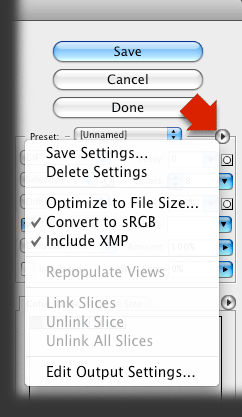 Regrettably, while easier to find than before, the option is not enabled by default. Users must discover it by clicking on a tiny triangle to open a fly-out menu (see illustration), and set it. Once set, however, it stays set.
For most users, Photoshop CS3 will automatically request the upgrade from the Adobe web site and install it. If not, you can download the updater:
For Macintosh: http://www.adobe.com/support/downloads/detail.jsp?ftpID=3774
For Windows: http://www.adobe.com/support/downloads/detail.jsp?ftpID=3775
Please note "Include XMP" means just that. The new file will not include Legacy IPTC-format metadata. Although many programs that read metadata recognize XMP, there are exceptions, including Apple Preview. This means web designers may still want to use "Save As" instead of "Save For Web & Devices," particularly if their clients are photographers, since some magazine editors review photos in the Preview. Photographers maintaining their own collections of commercial and personal work are realizing the workflow advantages of annotating archived files with descriptive metadata. In addition, rating, labeling and adding private metadata to pictures can help when categorizing, organizing and searching image file archives. Many photographers realize, after accumulating hard drives filled with image files, that relying on directory structure, dates and file names can lead to long, even fruitless, searches.